Turpis mollis

Sea summo mazim ex, ea errem eleifend definitionem vim. Ut nec hinc dolor possim mei ludus efficiendi ei sea summo mazim ex.

Was 2025 A Disaster?

Looking back on 2025, it felt like a long, challenging road, with more frustration than progress. Goals that once felt possible drifted out of reach, and even with serious effort, the payoff often wasn’t there. My drive dipped, and some days it felt nearly impossible to focus on anything, let alone chase big dreams. If the year left you feeling the same, you’re not alone. Many people struggled through a similar experience.

A symbolic image of a calendar marked 2025, crumpled or scattered on a desk among empty coffee cups and scattered notebooks, representing a year of struggle and frustration.

Was 2025 Really a Disaster?

Calling 2025 a disaster isn’t just about a tough year. For me, it summed up missed personal goals, financial roadblocks, feeling stuck in routines, and a sense that nothing was moving forward. Online trends highlighted job market changes, burnout, and rising stress. Reports from Forbes and Pew Research Center showed economic uncertainty and higher anxiety levels, which only added to a feeling of delay or disappointment for a lot of people. Even just keeping up healthy habits became exhausting at times.

A lot of my peers and friends echoed similar stories. Whether it was career plans falling through, business efforts stalling, or motivation running empty, 2025 tested patience. Looking at the bigger picture, I think it’s fair to say the year felt like a setback for many of us aiming for new heights. It wasn’t always clear what caused the stumbling blocks. Sometimes it was outside pressures, and sometimes our own tired routines kept us stalled.

How Did Effort and Motivation Drop?

I tried tackling my goals with the same energy I used in past years but noticed a significant drop in my results. I would work for hours and still end up with unfinished projects and ideas that never took off. Some days, I found myself scrolling social media just to escape the weight of constant “hustle” messaging. Many people around me fell into the same trap, working harder but not seeing meaningful outcomes.

All this exhaustion made it easy to doubt every new plan. Family and friends talked about feeling unmotivated at work or starting a new side business, only to lose passion after the first hurdle. Sometimes it wasn’t about a lack of effort; it was feeling overwhelmed by how little progress was being made, no matter how hard anyone tried. The cycle becomes difficult to spot when you’re in it, especially when comparison to others is so easy.

What Didn’t Work, and Why?

Reflecting on 2025, here are some patterns I noticed in myself and others:

  • Chasing too many projects at once, leading to burnout and no big wins
  • Ignoring new methods for old problems, falling back on what felt comfortable
  • Spending more time on instantgratification apps and less on deep work or learning
  • Sticking with negative or unmotivated social circles
  • Putting off uncomfortable activities that could create better opportunities

For me, these habits drained motivation. I started to see that I had to set smaller, more realistic targets instead of piling up big ones. Jumping between interests and platforms just got overwhelming. I needed to press pause and clear my head, while also paying attention to the simple things that truly helped progress.

Sometimes it felt easier to stick with what I knew than to risk trying something new, even when my old routine wasn’t working. That comfort can be a trap, keeping real change just out of reach. I learned that gently pushing outside the comfort zone, rather than making drastic overhauls, led to small but real gains. This approach took the pressure off, making progress feel possible again.

What Can I Do Differently in 2026?

If 2025 taught me anything, it’s that repeating the same approach will only bring the same results. I want 2026 to feel like a restart, not a rerun. So I’m outlining some simple changes that feel doable and could make a real difference.

  • Focus on mastering one new skill at a time, not five
  • Spend more time with positive, supportive friends and mentors
  • Swap out endless scrolling for reading books on topics I care about
  • Choose business or creative work that fits my strengths instead of what looks popular online
  • Set short, clear deadlines so progress feels manageable and rewarding

I’m planning to be honest with myself when things get overwhelming. I’ve also started using simpler workflows and small daily habits to stay motivated. The most important change I want to make is to stop expecting overnight change. Real growth takes small steps stacked over time, and accepting slow progress actually keeps me moving forward.

I have also set aside a little time each week to check in with myself, measure how far I’ve come, and adjust goals as needed. These check-ins stop the negative spiral before it takes over. Joining online groups or finding a study buddy can make the process feel less lonely, and even a quick conversation can spark fresh ideas or encouragement to keep going.

What Helped Me Learn from Failure?

Failure still stings, but I’ve found it can teach me a lot if I take the time to ask what went wrong instead of beating myself up. One of the best ways I learned to bounce back was by listening to others who had gone through the same struggles. Reading firsthand accounts or connecting with a local group gave me a perspective I couldn’t find on my own.

When I reviewed what actually worked for me or others, the common themes were steady routines, regular breaks from social media, and having at least one person to talk things out with. Even something as small as a weekly planning session or keeping a journal helped spot problems faster, so I could change course. Writing down short reflections on setbacks—what caused them, what I might try next—helped ease the shame that usually accompanied failure. Over time, failure started to feel more like feedback than a stop sign.

Simple Approaches for a Better Year

Here are some approaches I’m using to help 2026 turn out better:

  1. Reconnect with Purpose: Write down one reason why I want a change this year, and read it when I’m tempted to give up.
  2. Test, then Commit: Try small versions of new habits before fully committing, so failure isn’t scary. If something works, build on it.
  3. Design Down Time: Schedule real time away from devices, even if just for an hour, to recharge and keep perspective.
  4. Track Successes: Keep a list of even little wins. Looking back at progress gives a boost to motivation.
  5. Swap Out Negativity: Replace negative self-talk by noticing progress instead of only focusing on what went wrong.

These changes are small, but sticking with them helps me avoid the disaster loop of repeated disappointment. I also remind myself that resting isn’t wasting time—it’s rebuilding energy for next steps.

Is Big Change Really Possible in 2026?

I’ve found that real change comes from adjusting routines and mindsets, not just switching goals. If I want 2026 to look different, I have to be honest about what didn’t work and why. Rushing helps no one. Forcing myself to “do more” just led to burnout before. I’m focusing on “do what works, even if it feels small or slow.” This approach makes progress manageable and eases the feeling of being overwhelmed. Occasionally stepping outside my comfort zone also helps unlock new growth I would have missed otherwise.

Another tool that’s helped is setting up rewards for small achievements, not just big milestones. Having a treat or a break tied to completing a difficult task keeps motivation steady. It’s amazing how little shifts and paying attention to what really feels right can set a new tone for the year. Consistency, even if slow, is better than a burst of energy that fizzles out.

Why Humor and Comedy Help During Tough Times

Looking back, one thing that lifted my mood even on rough days was humor. Comedy didn’t fix my problems, but it gave my mind a break and let me reset. Sharing a funny story or watching a stand-up set with friends reminded me that things aren’t always as serious or permanent as they seem.

Research from the Mayo Clinic and the American Psychological Association shows that humor reduces stress, lowers anxiety, and even boosts resilience. It helps break tension; sometimes, after a laugh, I could come back to my tasks with fresh energy. I also found that humor helped me connect with others who were feeling the same stress. It was proof that sometimes the best support isn’t advice, but just a moment to laugh about how tough life can get. Trying to find humor in everyday setbacks doesn’t fix everything, but it makes things lighter, even if just for a little while. Humor is one of our oldest tools for getting through rough patches, and laughing with others makes us feel less alone.

Frequently Asked Questions About 2025 and Moving Forward

Question: If 2025 was such a tough year, does that mean I failed?
Answer: Not at all. A hard year doesn’t erase the effort you put in. It just means the approach or situation needs an update. Recognizing difficulty is part of learning and resetting.


Question: How do I avoid making the same mistakes in 2026?
Answer: Try one small change at a time, instead of overhauling everything at once. Tracking what you try and what sticks makes it easier to see progress and adjust as needed.


Question: Is it normal to lose motivation after a tough year?
Answer: Completely normal. Motivation comes and goes, especially after setbacks. Focusing on routines that restore energy and reaching out to supportive people can help bring it back.


What Do I Do Next?

If last year didn’t go well, things don’t have to stay that way. I’m using past setbacks as a guide for what to change, not a judgment. My plan is to keep actions clear and achievable, rely on positive connections, and use humor to recharge. Small switches are what make a big difference over time. Wrapping up, here’s to a better 2026, taking it one step at a time.

Reflection on 2025 and Looking Ahead to 2026

Transition 2025 to 2026
As 2025 comes to an end, it’s the perfect time to pause, reflect, and celebrate the progress made throughout the year. Within the Wealthy Affiliate community, this year has been filled with learning, growth, and collaboration. Many members launched their first online projects, tested new strategies, and took meaningful steps toward their goals.

A heartfelt thank-you goes out to everyone who shared their knowledge, encouraged others, and contributed to the vibrant spirit of this community. The support and connection among members are what make Wealthy Affiliate truly special and powerful.

2025 reminded us that consistency, curiosity, and community are the keys to long-term success. Even when plans didn’t unfold exactly as expected, every challenge brought valuable lessons and new perspectives — and that’s what real progress looks like.

As we look ahead to 2026, a new chapter begins. It’s a time to set fresh goals, refine strategies, and embrace new opportunities with confidence and enthusiasm. The digital landscape continues to evolve, and those who stay adaptable and committed to learning will thrive in the year ahead.

May 2026 be a year of growth, opportunity, and inspiration for everyone in the Wealthy Affiliate community.
Here’s to a successful, fulfilling, and prosperous New Year!

Happy New Year 2026!


How To Use Google Ai Studio

Google AI Studio is a powerful web-based platform that lets me build, test, and deploy AI models with minimal setup. I find that working with Google AI Studio helps me quickly experiment with generative AI, especially when I want to test Google's Gemini models or create prompts for new projects. If you are starting or switching from other AI platforms, learning how to use Google AI Studio can open up a lot of new opportunities for automating work, creating content, and even learning how large language models operate.

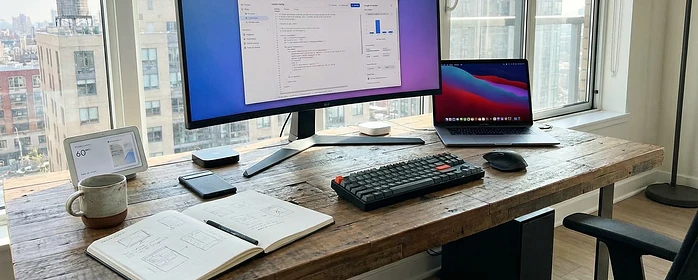
Screenshot showing Google AI Studio's interface on a computer screen against a minimal workspace with coffee and notepad.

Getting To Know Google AI Studio

Google AI Studio is designed for people who want to prototype ideas without advanced coding experience. Unlike some AI tools that require complex installations, I can get going right away with just a browser and a Google account. The Studio is very visual, so it's less intimidating than working with APIs and code from the start. Gemini, Google's large language model, powers most of the text-based features here, and I can customize or experiment with its settings to meet different needs.

Even if you haven't used AI platforms before, Google AI Studio makes it easy to try popular models or test your own prompts. It is built to be fast and interactive, so you can see results in real time and tweak your approach as you learn what works best.

Starting With Google AI Studio

Getting started usually takes just a few minutes. I log in with my Google account, then land on a web dashboard. There, I see templates for everyday tasks like text summarization, Q&A, translation, code generation, and content creation.

I can pick a template or start fresh with a custom prompt. For first-time users, spending some time exploring the dashboard helps to get a feel for everything available. I often recommend trying a few starter templates to see how Gemini handles different questions or creative requests.

  • Project Dashboard: Acts as the control panel where I organize my different AI projects and track their results.
  • Prompt Playground: The area where I enter and test prompts, making quick adjustments to see how the AI responds.
  • Export Tools: Allow me to download AI outputs or share them directly to other Google services.

Exploring these areas gives even beginners the confidence to try new ideas. The visual, step-by-step approach means I’m never lost or overwhelmed. Over time, I've come to appreciate how the layout encourages creativity, making it enjoyable to craft new queries or switch things up as my projects evolve.

How To Build And Test A Prompt

Developing prompts is the main way I use Google AI Studio, especially when I want Gemini to do something specific. Building a prompt means typing out an instruction or question in the Prompt Playground. I find that even minor tweaks to my wording can lead to better answers from Gemini.

  1. Enter Prompt: I describe the task I need, like "Summarize this news article" or "Write a friendly restaurant review."
  2. Adjust Settings: I can select from different Gemini models (e.g., Gemini 1.5 or Gemini Pro). Sometimes I change the temperature setting, which controls how creative or focused the results are.
  3. Run and View Results: Press submit, and Gemini responds right in the same window. I can rerun with tweaks to the wording or settings until the output feels right.
  4. Save or Export: After getting a result I like, it's simple to export it for use elsewhere.

One key thing I’ve found is that specific instructions usually yield precise results. For instance, instead of "Write a story," I say, "Write a two-paragraph story about a robot learning to cook." Being direct makes a difference.

Experimenting with prompt structure helps, too. When I add context or examples, Gemini does a better job following what I want. Sometimes, I run several variations and compare which structure brings out the best response for my needs.

Helpful Tips For Getting The Most From Google AI Studio

Some features in Google AI Studio make it more flexible than basic AI chat apps or search engines. Here are ways I’ve made the most of it:

  • Version Control: I save multiple prompt versions, allowing me to revisit or improve earlier work without starting over each time.
  • Templates for Teams: I create templates and share them with my team, which is super helpful when we're working on a shared project like a marketing campaign or a classroom assignment.
  • Direct API Integration: When I’m ready to go beyond the web interface, I can copy my prompt straight into Google’s AI API for more advanced development.

Changing the AI model or tweaking settings like output length and temperature has a significant impact. Sometimes a lower temperature makes responses more reliable, while a higher temperature produces more creative ideas. I find that some trial and error is worthwhile for learning how Gemini acts across different tasks.

Sharing templates with coworkers streamlines collaboration, too. We avoid duplicating effort by reusing successful prompt frameworks, letting us focus on refining ideas together. This collaborative approach keeps experiments fresh and productive.

What To Consider Before Using Google AI Studio

Like with any tech platform, there are a few things I keep in mind when using Google AI Studio. Privacy, cost, and the limits of AI-generated content are super important to consider.

  • Privacy and Data Security: I avoid entering sensitive or private information. Google logs my prompts to help improve services, so I treat each project with care.
  • Output Quality: Even advanced models like Gemini can make mistakes or misunderstand context. I always proofread or double-check critical content before publishing or sharing with others.
  • Free vs. Paid Usage: Google AI Studio typically offers a free tier for experimentation, but usage limits may apply, and advanced features may require a paid plan. Knowing these limits upfront helps me plan bigger projects.

Privacy and Security

I'm always aware that the information I put into prompts may be stored. If I'm working with confidential data, I avoid cloud-based tools or anonymize inputs. Checking Google’s privacy FAQs reassures me about which data is stored or shared.

Model Output Limitations

AI is excellent at making suggestions, summaries, or creative content, but it’s not always 100% accurate. For high-stakes writing or technical work, I proofread everything, as Gemini may sometimes invent facts or use outdated information.

Pricing And Usage Caps

Most of my early prototyping has been free, but for business uses or larger outputs, costs can add up. Google sometimes updates quotas, so I monitor my dashboard for warnings about usage caps or billing changes.

Understanding these fundamental issues helps me use Google AI Studio in a more innovative and secure way.

Advanced Features And Pro Tips

As I gained experience with Google AI Studio, I started using advanced features that significantly expand what’s possible. These aren’t required for beginners, but they’re great if I want more control or unique outcomes.

Chaining Prompts: I sometimes use the output from one prompt as input to another, which works well for building longer workflows or creative writing projects.

Role-Basedspecific expert, such as a teacher or software engineer, I can get more helpful responses Prompts: By telling Gemini to “act as” a certain expert, like a teacher or software engineer, I can get answers in a much more helpful tone for my project.

Custom Evaluation Metrics: If I’m testing many prompts, I create a checklist or a simple scoring system to compare results before sharing them outside the Studio.

These advanced options can save me time and support brainstorming, especially when I’m using AI for ongoing business or research needs. For teams, combining these features can streamline bigger projects and kickstart group creativity.

Google AI Studio For Practical Projects

I use Google AI Studio for a range of real-world tasks, from summarizing documents and writing emails to generating creative video scripts. Here are a few examples where it’s made my work easier or more fun:

  • Content Generation: I’ve developed social media posts, blog outlines, and story drafts, saving time compared to writing from scratch.
  • Homework Help: When I need a quick breakdown of a tricky topic, Gemini explains things in a way that helps me understand faster than reading through multiple articles.
  • Research Summaries: I feed in long text, such as meeting notes or research papers, and generate concise highlights to share with others or kickstart my own reports.

For business or education, the ability to experiment and improve outputs quickly is really valuable. The whole drag-and-drop, edit-and-retry setup feels efficient and approachable. This allows me to switch between creative brainstorming and technical writing without missing a beat.

Frequently Asked Questions

Here are some common questions you might have about using Google AI Studio:

Question: Do I need programming skills to use Google AI Studio? Answer: No coding is necessary for basic use. I write prompts and adjust settings in my browser. For advanced integrations, developer tools are available but optional.


Question: Is Google AI Studio free? Answer: There's a free basic tier. For higher usage or advanced features, a paid plan may be required. Details are available on the Studio's pricing page.


Question: Can I use Google AI Studio on any device? Answer: It works in any modern browser, so I use it on my laptop, desktop, or even my tablet, although the full experience is best on a larger screen.


Final Thoughts

Using Google AI Studio has let me try out the latest Gemini models and build projects without a complicated setup. From drafting content to exploring coding tasks, it's a flexible tool for anyone looking to add AI to their workflow. Taking care of my data and staying curious about new features has helped me get the best results.

If you’re curious about what AI can do, Google AI Studio is a friendly starting point. Watching Gemini in action can really help you find creative or practical solutions you may not expect from older AI platforms or chatbot apps.

Created with Visual Composer
Verified by ExactMetrics